Page 1 of 1
Cloudwatcher Windows and Android reporting different values
Posted: Tue Apr 21, 2026 6:02 pm
by Ventania
Using a standalone PocketCW2, it connects over WiFi to the LAN. Running astrosoftware on a Windows mini PC on the mount. This includes the AAG CW software that connects to the PocketCW2 and can then function as a Safety Monitor for my setyp. I also have the PocketCW2 Android app running on my phone, but do not really need to use it.
Last weekend though i noticed that both the Windows and Android software (while connected to the same single PocketCW2) report the same values for Ambient Temperature, Brightness and Relative Humidity, but Sky Temperature is reported differently: -16.1 in the AAG CW software and -21 degrees in the PocketCW2 Android application. What could cause this apparent offset of 5 degrees?
Re: Cloudwatcher Windows and Android reporting different values
Posted: Wed Apr 22, 2026 9:08 am
by Queen Bee
Hi,
Águeda here. It sounds like your K-factors are different in the Windows software and in the pocketCW2 itself (this is configured from the pocketCW2 configuration tool, which you can find on
the Downloads page). Because of the way the Windows software works and so that it's compatible with both the CloudWatcher and the pocket, it doesn't take the K-factors from the unit itself but from its own settings, so if using them both you'll have to set the K-factors twice.
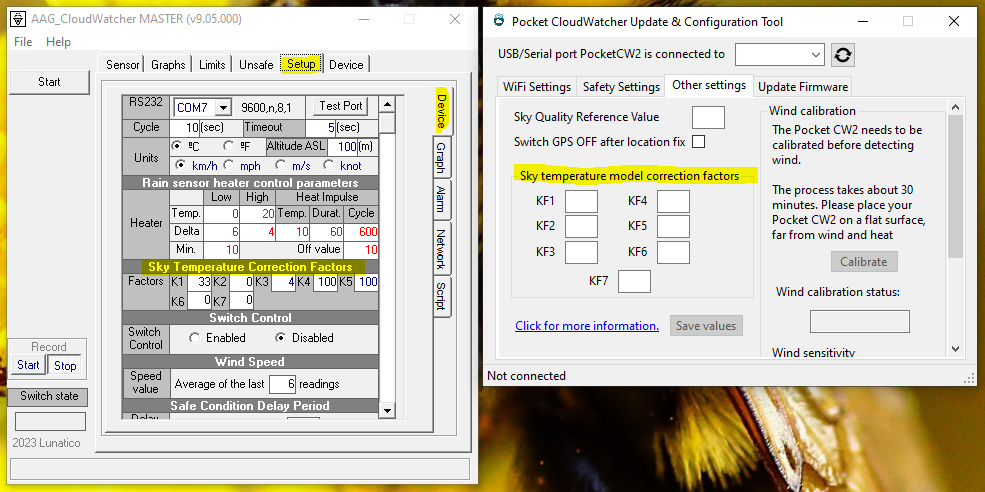
- imagen.png (205.13 KiB) Viewed 2731 times
I hope this helps, don't hesitate to reach out if you have any further questions.
Best,
Águeda ~ Queen Bee
Re: Cloudwatcher Windows and Android reporting different values
Posted: Wed Apr 22, 2026 6:13 pm
by Ventania
Hola Águeda!
Thanks for the quick reply and clear explanation. I have only used the PocketCW2 software once when I received the device about a year ago. Used the software to have the PocketCW2 connect to my WiFi access point and also to update the firmware. I have not touched those K-factors, so those will still have their default values or perhaps even blank. I will reconnect the PocketCW2 via USB to a computer with the PocketCW2 configuration tool and have a closer look.
The AAG CW software is also used on another site connected to a Solo that is connected to a CloudWatcher. I have also never changed the K-factors in the AAG CW software. The default values for the K-factors seem to be fine and all I change is the sky temperature limits for Clear or Cloudy. Do you have documentation for the K-factor optimization tool provided by Joerg Klaas? It is not entirely intuitive for me and messing around with those K-factors is something I would rather avoid, unless necessary.
Should I set the same K-factors in the PocketCW2 configuration as in the AAG CW software to obtain the same sky temperature readings?
While we are at it: what is the meaning of the Sky Quality Reference Value in the PocketCW2 configuration? That data is also available in the AAG CW software, but not documented. The online CloudWatcher manual refers to software version 9.02.005 while I am using the more recent version 9.05.000. SQM Darkness Reference is at the bottom of the Setup page on the Device tab. Its value is slightly different from the one in the PocketCW2 configuration tool (there at the top of the Other settings tab). Should these values be the same?
Update: The only difference in K-factors between the AAG CW software and the PocketCW2 configuration was the K2 factor. This was set to zero in the AAG CW software and had a value of 22 in the PocketCW2 software. I have now also set that to zero. Result for now is that the difference in Sky Temperature has increased from 5 to 10 degrees: Windows AAG CW reporting -17, Android PocketCW2 reporting -27.
I have also configured the Safety Settings with the PocketCW2 configuration tool, but do not understand where these are used. Not in the AAG CW software as you have already explained and also not in the Android PocketCW2 application. What is then the use case for those Safety Settings in the PocketCW2 configuration tool?
Sorry, loads of questions again...
Best regards,
Hans
Re: Cloudwatcher Windows and Android reporting different values
Posted: Thu Apr 23, 2026 12:43 am
by Queen Bee
Hi Hans,
No problem, we're here to help.
If you have a Solo and are using the Windows software as Remote, it's still going to be using its own K-factors (whereas the Solo will use the ones configured in
https://aagsolo/config)
imagen.png
What this means is whichever changes you make to the software's K-factors to adjust your pocket's readings will impact your CloudWatcher's readings when you get them from the software. There's a way to bring the configuration from the Solo into the Windows software, but I'm not sure that'd interest you at this point. I understand this is a bit confusing, but basically:
- The data visible on the Windows software will use the K-factors configured in it
- The data visible in the Android app will use the K-factors configured in the pocketCW itself
- The data visible on the Solo's webpage will use the K-factors configured in the Solo
...we'll definitely centralise all K-factors in the not-too-distant future
Documentation for Joerg's tool can be found on his Github repository:
https://github.com/joergs-git/cloudwatcher-optimizer
Calibration of the SQM reference value is explained here:
https://lunaticoastro.com/docs/SQMCalib ... tchers.pdf. Apologies that that isn't referenced in the manual, we've been meaning to rewrite it but we haven't yet been able to.
But this still leaves the question of why those readings are different. Can you confirm that the other readings are all identical? This can only be a settings issue but I'm not sure what we can be missing. If it doesn't become apparent quickly I'd recommend you send us an email at
support@lunaticoastro.com and we'll be able to assist you better from there. Just be sure to include the readings you're getting on the two devices, their associated K-factors, and the contents of the CW data file (you can access that via
http://pocketcw/cwdata.json while having the pocketCW2 on the network).
Best,
Águeda ~ Queen Bee